

Project type: Game Design
Date of Game Start Creation: Sep 2026
Location: Academy of Art University
Bio: I started this game as a project for my class assignment. The main focus was to create a story driven
small grind game where players main focus is to complete quests, earn money, and train their
character to level up their stats. At the same time I wanted to practice and learn how to create an
engaging tutorial that is fully functional and creates a fluid gameplay.
Credit: Cogabushi - AI Art background and characters
Createdbyjerry - UI Background
Wenrexa - Several UI icons

Character Screen
The character screen started out as just choosing your character looks by choosing their sex and then choosing their race. As the game creation continued I added a script in which the decision the player chooses for their race can affect their overall abilities in the game. As of currently now there are Humans and Beastman, each with their own set of stats and special abilities that will be explained in future development and logs.

Main Screen
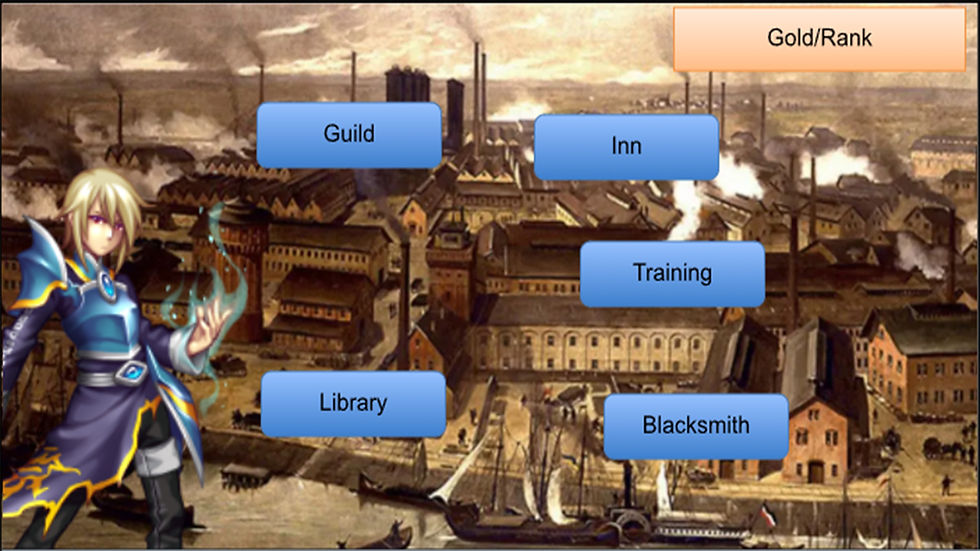
The main screen is the main common screen that players will come back to and choose where they will go. Each area has its own importance in what they do to assist the player as well going on quest in the Guild. The library and Train are used to upgrade the players stats and future abilities that can affect the players battle style whether it is physical, magic, or a bit of both. During this process I set up the main UI to follow the player throughout the scenes as needed and created a bool to disable the UI as needed. Like in the Library scene and Training scene when playing the mini games.


Library Screen
I started the blockout for the library as a temporary setup scene to create a script in which setting up a button and name of the scene can direct the player to the appropriate next scene. Afterwards I started to add the image and buttons to setup for the mini game to enhance a players stats. I decided a simple memory game in which it uses the person thinking to memorize the cards when flipped over and locate their matching set. Once the game was working, I added a difficulty setup script in which the players can decide how hard they choose to complete the mini game and depending on the difficulty completed it upgrades the players stats differently.


Training Scene
While already an idea for the background image and having a pre-built difficulty buttons created in the library scene I copied and transferred all the necessary data and UI to the training scene. After setting up the scene for the button match game, as it relied on quick reaction and thinking, I created the blockout as well as the prefabs for the arrow designs. Then I began to work on the script in which the buttons are randomly displayed and both the arrow keys and WASD keys work. Any other button would count as a wrong key press.


Guild Scene
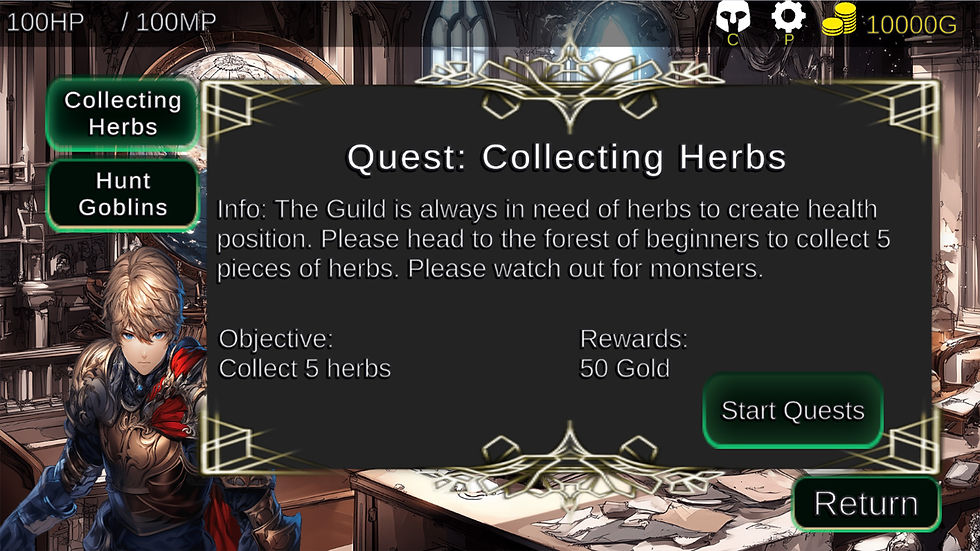
The scene for the of the guild I had a premade guild scene and I needed to create a UI layout for the Guild and what it would compromise of. I created a simple E-Quest button that will load a list of Quests the player can take. Within the quest I planned to create two types of quest. One is a simple collecting job and another a fight against monsters that will be implemented down the line. The player will select the quest they wish to take and then they will see a brief summary of what the job entails. It includes the brief story, objectives, and rewards. Once they hit start Quest it will load the scene depending on what they selected.


First Quest
The first quest that I started was a simple gathering quest where I created a simple blockout level that had a random button appear somewhere on the screen. By clicking on the button it will count as collecting an object and removing it after the player clicks it. Then I decided to also introduce the combat system in the quest so the player can understand how it works. Originally I planned to have the player only have a certain amount of moved, but then I began to think that maybe the player can increase their action points or AP, that relies on their agility stats. The more agility stats the more moves a player can make. Then I spent time creating documentation of the combat system and what each action will do.


Attack will cost 2AP and Defend Costing 1 AP. For further look into the documentation look above for the link to the GDD. After having an idea of what I needed to create I began to create the programming for attacking and defending as well as creating simple button blockout that will perform the actins the player wishes to perform. Afterwards I needed to create an enemy controller that will have stats that can be used across all enemies and their actions. Once I created finished the programming I needed to create a sequence for a goblin to attack the player that is unique only to goblins. Then I created a design UX for the Health bar and AP for the enemy. After trying out a few designs I stuck with the design below, then implemented to the player character as well. Once the programming was done I finished by updating the UX design for all the blockout and UI design for the collecting object with herbs that highlighted when selected. Finally finishing it by polishing the level design scene and fixing any bugs that occured.
After testing the working game and the arrow keys would change directions I began to first create a visual element to showcase if the player press the right key otherwise it would reset and change directions. Only after this was working I began to set up the difficulty level setup that would increase the number of buttons that needed to be pressed depending on the level picked as well as the reward stats increase depending on the level completed for the players physical stats. After playtesting by myself and others I finished by adding the timer and the score needed to complete the mini game.